
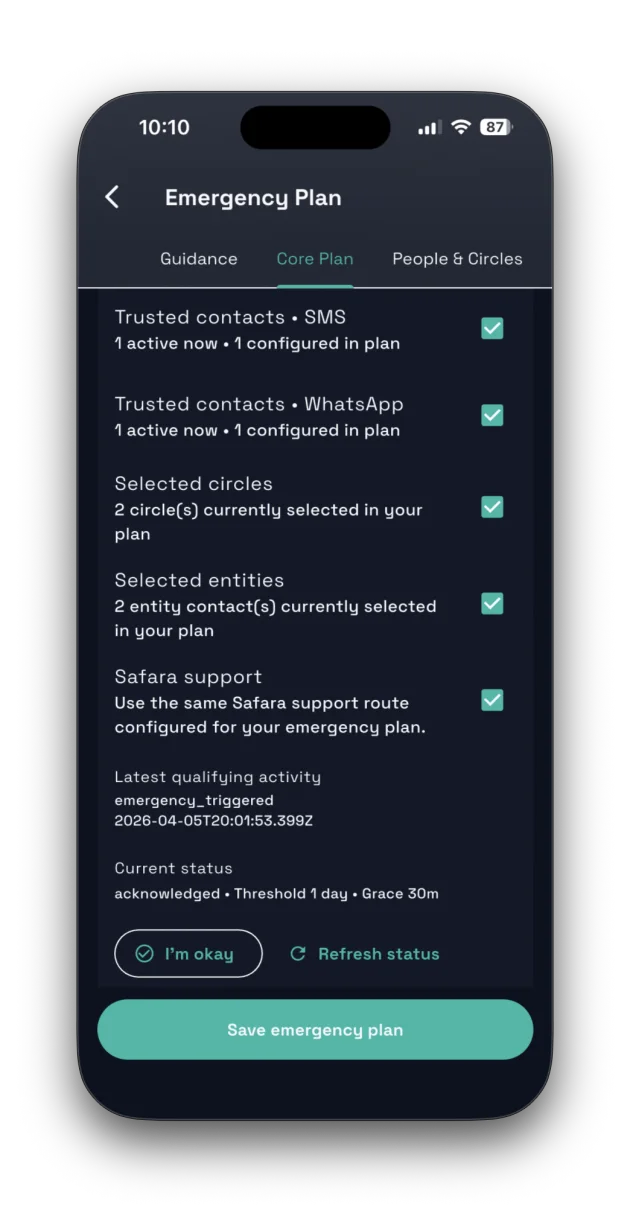
Emergency Plan

Configure contacts, routing, and emergency behavior.

  • Enable plan, default emergency type, silent mode, hold to send
  • Notify trusted contacts, selected circles, selected entities, and Safara support
  • Review summary and save emergency plan state

People and circles

Emergency Plan People & Circles flow aligns with in-app wording.

  • In-App Responders selected from real Safara users
  • Trusted Circles with private/family selection support
  • Emergency Lists Including You with self-removal controls

Evidence Vault

Private evidence storage for reports and testimonies.

  • Add evidence with type-aware uploads
  • Vault usage tracking and entitlement-aligned storage limits
  • Vault Lock + 2FA-aware protections for destructive actions

Free and paid channel behavior

Emergency channel language mirrors app guidance and review states.

  • In-app and email alerts are free channels
  • SMS, WhatsApp, and in-app call triggers use monthly allowance
  • If paid channel allowance is exhausted, Safara falls back to configured free channels
  • Priority order and active plan limits affect paid dispatch eligibility

Entity and support routing

Entities & Support tab uses existing partner records only in this phase.

  • Select existing organizations or support partners
  • No entity creation required for emergency routing setup
  • Channel usage follows verified contact methods on file
  • Review screen surfaces selected entity count and limits

Emergency audio escalation

Emergency trustee audio escalation is available on Safara Plus and Circle, with optional per-trustee note assignment and cascade behavior when enabled by entitlement.

Safety flows in action

Safara emergency plan setup
Emergency plan setup with responder and channel policy controls.
Safara emergency trigger screen
Trigger flow keeps hold-to-send and silent mode decisions visible under pressure.
Safara emergency audio call flow
Emergency audio calling keeps trustee escalation close when minutes and channels allow it.

Set up your plan before you need it.

Emergency readiness is strongest when trusted contacts, circles, and evidence workflows are already configured. Safara prioritizes preparation and clear fallback paths.